这一章在干嘛?
计算机的本事就是不知疲倦地重复。要算 16 个阶乘、把数组每个元素加一遍、逐个字符读入一篇文章,总不能把同一条语句抄 20 遍。本章讲 C++ 的三种循环(for、while、do while)、配合循环的递增递减运算符和关系表达式,以及一个特别实用的场景——用循环逐字符处理文本输入。学完这章,配合上一章的数组,你的程序才算真正”能干活”。
5.1 for 循环
程序清单 5.1 用最简单的 for 循环打印 5 行字:
// forloop.cpp -- for 循环入门
#include <iostream>
int main()
{
    using namespace std;
    int i; // 计数器
    // 初始化;测试;更新
    for (i = 0; i < 5; i++)
        cout << "C++ knows loops.\n";
    cout << "C++ knows when to stop.\n";
    return 0;
}
C++ knows loops.
C++ knows loops.
C++ knows loops.
C++ knows loops.
C++ knows loops.
C++ knows when to stop.循环先把 i 设为 0(初始化),然后测试 i < 5:为真就执行循环体,再用 i++(更新,把 i 加 1)完成一轮;回到测试,如此往复,直到 i 变成 5、测试失败,程序才走向循环后面的语句。i++ 里的 ++ 叫递增运算符,作用是把操作数加 1。
for 循环的完整配方:
for (initialization; test-expression; update-expression)
    body
三个要点:
- 初始化只在开头执行一次,通常用来设起始值;
- 测试表达式决定循环体是否执行。它不必是 true/false 比较——任何表达式都会被转换成 bool:0 变 false 结束循环,非 0 变 true 继续。程序清单 5.2 用
i本身当测试条件,倒计数到 0 自动停:
// num_test.cpp -- 在 for 循环中使用数值测试
#include <iostream>
int main()
{
    using namespace std;
    cout << "Enter the starting countdown value: ";
    int limit;
    cin >> limit;
    int i;
    for (i = limit; i; i--) // i 为 0 时退出
        cout << "i = " << i << "\n";
    cout << "Done now that i = " << i << "\n";
    return 0;
}
Enter the starting countdown value: 4
i = 4
i = 3
i = 2
i = 1
Done now that i = 0- for 是入口条件循环:每次循环前先测试。如果一开始条件就是假(比如输入 0),循环体一次都不执行——“先看再跳”,这种态度能让程序少踩坑。
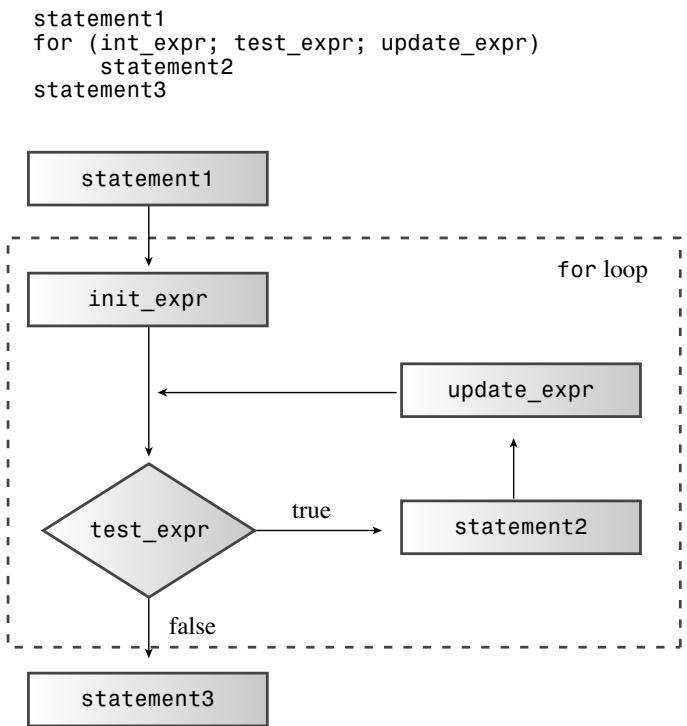 ▲ 图 5.1 for 循环的设计
在初始化部分声明变量是 C++ 的常见写法:for (int i = 0; i < 5; i++)——这样的 i 只在 for 语句内存在,出了循环就没了。循环体按语法只是一条语句,想放多条就得用花括号包成块(见 5.4)。
程序清单 5.4 用循环算阶乘,顺带展示了 for 与数组的黄金搭档关系:
// formore.cpp -- 更多 for 循环
#include <iostream>
const int ArSize = 16;    // 外部声明的例子
int main()
{
    long long factorials[ArSize];
    factorials[1] = factorials[0] = 1LL;
    for (int i = 2; i < ArSize; i++)
        factorials[i] = i * factorials[i-1];
    for (int i = 0; i < ArSize; i++)
        std::cout << i << " != " << factorials[i] << std::endl;
    return 0;
}
0! = 1
1! = 1
2! = 2
3! = 6
4! = 24
5! = 120
6! = 720
7! = 5040
8! = 40320
9! = 362880
10! = 3628800
11! = 39916800
12! = 479001600
13! = 6227020800
14! = 87178291200
15! = 1307674368000数组下标从 0 到 ArSize-1,所以测试写 i < ArSize 正好停在下标越界之前。把数组大小定义为 const 符号常量(ArSize),改规模时只改一处。
程序清单 5.5 说明更新表达式可以是任意表达式(这里每步加用户指定的步长):
// bigstep.cpp -- 按指定步长计数
#include <iostream>
int main()
{
    using std::cout;    // using 声明
    using std::cin;
    using std::endl;
    cout << "Enter an integer: ";
    int by;
    cin >> by;
    cout << "Counting by " << by << "s:\n";
    for (int i = 0; i < 100; i = i + by)
        cout << i << endl;
    return 0;
}
Enter an integer: 17
Counting by 17s:
0
17
34
51
68
85注意:测试用 i < 100 而不是 i == 100——i 从 85 直接跳到 102,等于 100 的时刻根本不存在,等值测试会永远错过。范围测试优于等值测试。
程序清单 5.6 用 for 逐字符倒序打印一个单词:
// forstr1.cpp -- for 与 string 搭配
#include <iostream>
#include <string>
int main()
{
    using namespace std;
    cout << "Enter a word: ";
    string word;
    cin >> word;

    // 倒序显示字母
    for (int i = word.size() - 1; i >= 0; i--)
        cout << word[i];
    cout << "\nBye.\n";
    return 0;
}
Enter a word: animal
lamina
Bye.word.size() 给出字符数,i 从最后一个下标开始、用 -- 每轮减 1、用 >= 测试是否到达第一个字符。
自测:输入起始值为 0 时,清单 5.2 的循环体执行几次?
零次。for 是入口条件循环,第一次测试
i(值为 0,即 false)就失败了,直接跳到循环后面的语句。
5.2 表达式与语句
C++ 中任何值或值与运算符的合法组合都是表达式,且每个表达式都有值。 22 + 27 的值是 49;x = 20 也是表达式——赋值表达式的值被定义为左侧成员的值,即 20。正因如此,maids = (cooks = 4) + 3; 会让 maids 得到 7;同样地,x = y = z = 0; 能一口气把三个变量清零(赋值从右向左结合)。关系表达式 x < y 的值是 bool 的 true/false。
程序清单 5.3 验证这些说法:
// express.cpp -- 表达式的值
#include <iostream>
int main()
{
    using namespace std;
    int x;

    cout << "The expression x = 100 has the value ";
    cout << (x = 100) << endl;
    cout << "Now x = " << x << endl;
    cout << "The expression x < 3 has the value ";
    cout << (x < 3) << endl;
    cout << "The expression x > 3 has the value ";
    cout << (x > 3) << endl;
    cout.setf(ios_base::boolalpha); // 让 cout 显示 true/false 字样
    cout << "The expression x < 3 has the value ";
    cout << (x < 3) << endl;
    cout << "The expression x > 3 has the value ";
    cout << (x > 3) << endl;
    return 0;
}
The expression x = 100 has the value 100
Now x = 100
The expression x < 3 has the value 0
The expression x > 3 has the value 1
The expression x < 3 has the value false
The expression x > 3 has the value truecout 默认把 bool 转成 1/0 显示,cout.setf(ios_base::boolalpha) 让它显示 true/false 字样。
求值改变内存中的数据叫副作用(side effect):求值 x = 100 的副作用是 x 变成 100;x + 15 不改任何东西,++x + 15 会。表达式加个分号就成了语句:age = 100 是表达式,age = 100; 是表达式语句。反过来的推论不成立——并非语句去掉分号就是表达式:int toad; 是声明语句,int toad 不是表达式没有值,所以 eggs = int toad * 1000; 非法。for 循环本身也不是表达式,不能赋给变量。
顺带一提:C++ 语法经过调整,允许在 for 的初始化部分放声明语句(如 for (int i = 0; ...)),这样声明的变量只属于这个循环。
5.3 递增与递减运算符
++ 和 — 各有两种形态,对操作数的最终效果相同,差别在生效时机:
- 前缀
++x:先加 1,再在表达式中使用新值; - 后缀
x++:先在表达式中使用当前值,再加 1。
就像修剪草坪先付钱还是后付钱——钱包最终一样,时点不同。程序清单 5.7:
// plus_one.cpp -- 递增运算符
#include <iostream>
int main()
{
    using std::cout;
    int a = 20;
    int b = 20;

    cout << "a = " << a << ": b = " << b << "\n";
    cout << "a++ = " << a++ << ": ++b = " << ++b << "\n";
    cout << "a = " << a << ": b = " << b << "\n";
    return 0;
}
a = 20: b = 20
a++ = 20: ++b = 21
a = 21: b = 21用代码总结:
int x = 5;
int y = ++x; // 先改 x 再赋给 y:y 是 6,x 是 6
int z = 5;
int y = z++; // 先赋给 y 再改 z:y 是 5,z 是 6
常见坑:同一条语句里对同一变量多次递增/递减
x = 2 * x++ * (3 - ++x);这类语句 C++ 不定义正确行为,不同系统结果可能完全不同。一条语句最多让一个变量自增/自减一次。
背后的原理是副作用与序列点:分号是序列点,语句中所有副作用(赋值、++、—)必须在进入下一条语句前完成。while (guests++ < 10) 的测试是完整表达式,C++ 保证比较用旧值、进入 cout 前 guests 已加 1。但 y = (4 + x++) + (6 + x++); 里两个子表达式都不是完整表达式,C++ 不保证 x 在子表达式之间被递增,所以结果因编译器而异——避开这种写法就好。
如果表达式的值没被使用(比如单独一条 x++; 或 for 的更新部分),前缀后缀效果相同。但对类类型(如迭代器)而言前缀版本效率略高(后缀要先存一份副本),习惯上值得留意。
与指针搭配
指针的 ++ 遵循指针算术规则:++pt 让 pt 指向下一个元素。* 和 ++ 组合时,看运算符的位置和优先级:
double arr[5] = {21.1, 32.8, 23.4, 45.2, 37.4};
double *pt = arr;   // pt 指向 arr[0],即 21.1
++pt;               // pt 指向 arr[1],即 32.8

double x = *++pt;   // 先 ++ 指针再解引用:arr[2],即 23.4
++*pt;              // 先解引用再 ++ 值:23.4 变 24.4,pt 不动
(*pt)++;            // 括号强制先解引用:24.4 变 25.4,pt 不动
x = *pt++;          // 后缀优先级高:取 arr[2] 的值 25.4,然后 pt 指向 arr[3]
口诀:前缀 *++pt 先动指针;++*pt 与 (*pt)++ 动的是值;后缀 *pt++ 取原位置的值然后指针后移。
5.4 组合赋值运算符与代码块
i = i + by 可以简写成 i += by。每种算术运算符都有对应的组合赋值形式:
| 运算符 | 效果(L=左操作数,R=右操作数) |
|---|---|
| += | 把 L + R 赋给 L |
| -= | 把 L - R 赋给 L |
| *= | 把 L * R 赋给 L |
| /= | 把 L / R 赋给 L |
| %= | 把 L % R 赋给 L |
左侧必须是可赋值的东西(变量、数组元素、结构成员、解引用的指针):k += 3;、pa[4] += 6;、*(pa + 4) += 7; 都行,34 += 10; 就错了。
代码块(复合语句)
for 的循环体按语法只有”一条语句”,但用成对花括号可以把多条语句打包成一个复合语句(块),整体算一条。程序清单 5.8 的循环体要提示、读入、累加三件事:
// block.cpp -- 使用块语句
#include <iostream>
int main()
{
    using namespace std;
    cout << "The Amazing Accounto will sum and average ";
    cout << "five numbers for you.\n";
    cout << "Please enter five values:\n";
    double number;
    double sum = 0.0;
    for (int i = 1; i <= 5; i++)
    {   // 块从这里开始
        cout << "Value " << i << ": ";
        cin >> number;
        sum += number;
    }   // 块到这里结束
    cout << "Five exquisite choices indeed! ";
    cout << "They sum to " << sum << endl;
    cout << "and average to " << sum / 5 << ".\n";
    cout << "The Amazing Accounto bids you adieu!\n";
    return 0;
}
The Amazing Accounto will sum and average five numbers for you.
Please enter five values:
Value 1: 1942
Value 2: 1948
Value 3: 1957
Value 4: 1974
Value 5: 1980
Five exquisite choices indeed! They sum to 9801 and average to 1960.2.
The Amazing Accounto bids you adieu!如果保留缩进却漏掉花括号,编译器不理会缩进——循环体只剩第一条 cout,循环只会打印 5 次提示,读入和累加都发生在循环结束之后。
块还影响变量寿命:块内定义的变量只在块内存在,出了块就被释放。外层块的变量在内层仍可见;但如果内层声明了同名变量,在内层它会遮蔽外层的同名变量,出块后外层变量恢复可见。
通关标准:
能背出五种组合赋值运算符;能解释”循环体只有一条语句”时如何放多条(花括号);能说出块内同名变量遮蔽外层变量的行为。
5.5 逗号运算符
块解决的是”一条语句的位置放多条语句”,逗号运算符解决的是”一个表达式的位置放多个表达式”。比如循环里想让 j 每轮加 1、i 每轮减 1,更新部分却只能放一个表达式:
++j, --i // 两个表达式在语法上算一个注意区分:int i, j; 里的逗号只是列表分隔符,不是运算符。程序清单 5.9 用逗号运算符把字符串真正倒转(清单 5.6 只是倒着打印,这里原地交换字符):
// forstr2.cpp -- 反转数组
#include <iostream>
#include <string>
int main()
{
    using namespace std;
    cout << "Enter a word: ";
    string word;
    cin >> word;

    // 物理修改 string 对象
    char temp;
    int i, j;
    for (j = 0, i = word.size() - 1; j < i; --i, ++j)
    {   // 开始块
        temp = word[i];
        word[i] = word[j];
        word[j] = temp;
    }   // 结束块
    cout << word << "\nDone\n";
    return 0;
}
Enter a word: stressed
desserts
Done初始化部分 j = 0, i = word.size() - 1 和更新部分 --i, ++j 都各塞了两个表达式进一个位置。
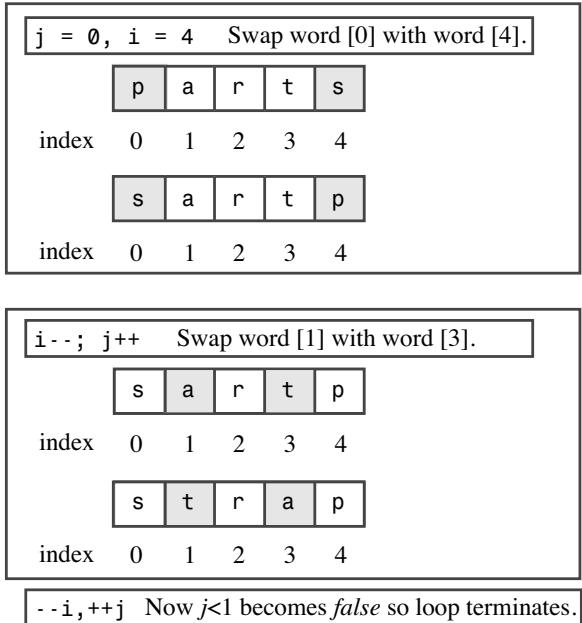 ▲ 图 5.2 反转一个字符串
测试条件 j < i 让循环在到达中点时停止——继续换下去会把换好的字符再换回去。逗号运算符还有两个性质:保证先算左边再算右边(它是序列点,i = 20, j = 2 * i 安全且 j 得 40);整个逗号表达式的值是右边部分的值。它的优先级最低:cats = 17, 240; 被读成 (cats = 17), 240;,cats 是 17;而 cats = (17, 240); 里括号优先,cats 得 240。
自测:
int j = 0, i = word.size() - 1;里的逗号是逗号运算符吗?不是,它是声明语句里分隔变量列表的分隔符。这也是清单 5.9 把 i、j 的声明提到循环外的原因——不能用逗号运算符合并两个声明。
5.6 关系表达式
计算机的决策能力建立在比较之上。C++ 有六个关系运算符,结果都是 bool 的 true/false:
| 运算符 | 含义 |
|---|---|
| < | 小于 |
| <= | 小于或等于 |
| == | 等于 |
| > | 大于 |
| >= | 大于或等于 |
| != | 不等于 |
关系运算符比算术运算符优先级低,所以 x + 3 > y - 2 就是 (x + 3) > (y - 2)。
= 与 == 的世纪大坑
musicians == 4 是比较(值为 true/false);musicians = 4 是赋值(整个表达式值为 4,非 0 即真)。如果把 == 手滑写成 =,代码依然合法,测试永远为真。程序清单 5.10 故意演示后果:
// equal.cpp -- 相等与赋值
#include <iostream>
int main()
{
    using namespace std;
    int quizzes[10] = { 20, 20, 20, 20, 20, 19, 20, 18, 20, 20};

    cout << "Doing it right:\n";
    int i;
    for (i = 0; quizzes[i] == 20; i++)
        cout << "quiz " << i << " is a 20\n";
    // 警告:你也许更愿意"读"这个程序而不是"运行"它
    cout << "Doing it dangerously wrong:\n";
    for (i = 0; quizzes[i] = 20; i++)
        cout << "quiz " << i << " is a 20\n";
    return 0;
}
Doing it right:
quiz 0 is a 20
quiz 1 is a 20
quiz 2 is a 20
quiz 3 is a 20
quiz 4 is a 20
Doing it dangerously wrong:
quiz 0 is a 20
quiz 1 is a 20
quiz 2 is a 20
quiz 3 is a 20
quiz 4 is a 20
quiz 5 is a 20
quiz 6 is a 20
quiz 7 is a 20
quiz 8 is a 20
quiz 9 is a 20
quiz 10 is a 20
quiz 11 is a 20
quiz 12 is a 20
quiz 13 is a 20错的那行 quizzes[i] = 20 一石三鸟地闯祸:表达式的值恒为 20(真)所以循环不停;赋值篡改了数组数据;测试永远为真导致程序越过数组边界往后面的内存疯狂写 20,可能殃及系统。语法完全正确所以编译器不报错(好在如今多数编译器会警告)。
常见坑:把 == 写成 =
习惯:比较时把常量写左边,
if (3 == myNumber)——手滑成3 = myNumber编译器直接报错,等于免费请了个查错员。
比较字符串:不能用 ==
word == "mate" 比较的不是字符串内容,而是两个地址是否相同——数组名和字符串常量都是地址,答案永远是”不同”。C 风格字符串比较要用 cstring 库的 strcmp():两串相同返回 0,第一串按系统排序序列在前返回负值、在后返回正值。所以:
strcmp(str1, str2) == 0   两串相同
strcmp(str1, str2) != 0   两串不同
strcmp(str1, str2) < 0    str1 在前
strcmp(str1, str2) > 0    str1 在后
程序清单 5.11 在 for 测试条件里直接用 strcmp(word, "mate") 当真值(不同为真):
// compstr1.cpp -- 用数组比较字符串
#include <iostream>
#include <cstring>    // strcmp() 的原型
int main()
{
    using namespace std;
    char word[5] = "?ate";
    for (char ch = 'a'; strcmp(word, "mate"); ch++)
    {
        cout << word << endl;
        word[0] = ch;
    }
    cout << "After loop ends, word is " << word << endl;
    return 0;
}
?ate
aate
bate
cate
date
eate
fate
gate
hate
iate
jate
kate
late
After loop ends, word is matechar 本质是整型所以能 ++,word[0] = ch 用下标直接改某个字符。顺带说明:字符串按字符编码排序,ASCII 里大写字母码值小于小写,所以 “Zoo” 排在 “aviary” 前面,“FOO” 与 “foo” 不相等。
而 string 类对象可以直接用关系运算符(运算符重载的功劳),程序清单 5.12 与 5.11 输出完全相同,测试条件却是人类友好的 word != "mate":
// compstr2.cpp -- 用 string 类比较字符串
#include <iostream>
#include <string>    // string 类
int main()
{
    using namespace std;
    string word = "?ate";
    for (char ch = 'a'; word != "mate"; ch++)
    {
        cout << word << endl;
        word[0] = ch;
    }
    cout << "After loop ends, word is " << word << endl;
    return 0;
}
?ate
aate
bate
cate
date
eate
fate
gate
hate
iate
jate
kate
late
After loop ends, word is mate测试条件左边是 string 对象、右边是 C 风格字符串——运算符重载规定至少一边是 string 对象即可。string 类让你既能把对象当单一实体参与比较,又能用数组记法取出单个字符。C 风格能做的事 string 都能做,而且更简单直观。注意这两个循环都不是数圈子的计数循环,而是”等到某个条件出现就停”的守望循环——这种场景更常用 while。
5.7 while 循环
while 就是剥掉初始化和更新部分的 for:
while (test-condition)
    body
先测试,为真执行循环体,再回来测试……直到条件为假。和 for 一样是入口条件循环,一开始就为假则一次都不执行。
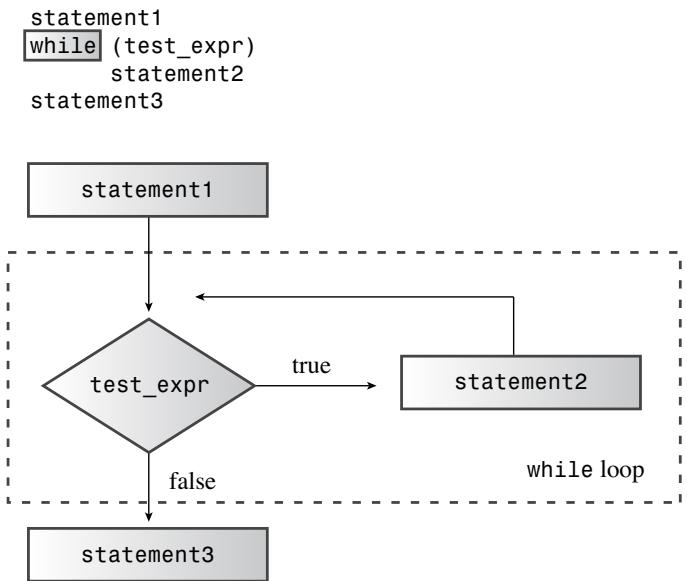 ▲ 图 5.3 while 循环的结构
想让它停,循环体内必须有东西影响测试条件(递增计数器或读新输入),否则就是死循环。程序清单 5.13 用 while 逐字符处理 C 风格字符串:
// while.cpp -- while 循环入门
#include <iostream>
const int ArSize = 20;
int main()
{
    using namespace std;
    char name[ArSize];

    cout << "Your first name, please: ";
    cin >> name;
    cout << "Here is your name, verticalized and ASCIIized:\n";
    int i = 0;                    // 从字符串开头开始
    while (name[i] != '\0')       // 处理到字符串末尾
    {
        cout << name[i] << ": " << int(name[i]) << endl;
        i++;                      // 别忘了这一步
    }
    return 0;
}
Your first name, please: Muffy
Here is your name, verticalized and ASCIIized:
M: 77
u: 117
f: 102
f: 102
y: 121“走到 \0 为止”是处理 C 风格字符串的标准套路——字符串自带终止标记,程序不必知道它的长度。漏掉 i++ 会永远卡在第一个字符上打印,死循环是循环最常见的毛病。while (name[i] != '\0') 可简写成 while (name[i])——普通字符码非 0 为真,\0 为 0 即假,但前者更清晰。
for 与 while 的取舍
两者几乎可以互相改写(for (;test;) 等价于 while (test)),for 省略测试表达式视为真,for (;;) 就是死循环。选择主要看风格:数得清圈数用 for(初值、终值、步长一目了然);事先不知道要循环几次用 while。设计循环的三条军规:找到让循环终止的条件、在首次测试前初始化它、每轮循环里更新它。
常见坑:标点和缩进的骗局
其一,花括号才定义块,缩进不算数:while 下面缩进的
i++;若没加花括号,根本不在循环体里,循环会无限打印第一个字符。其二,小心多余的顿号分号:while (name[i] != '\0');这里的分号让循环体成了空语句,循环永远空转,花括号里的代码反而在循环之后永远执行不到。
5.8 类型别名与延时循环
typedef
给类型起别名有两种办法。预处理器 #define BYTE char 只是文本替换,对指针列表会出错(#define FLOAT_POINTER float * 展开后 FLOAT_POINTER pa, pb; 里 pb 只是个 float);typedef 才是正路:
typedef char byte;              // byte 是 char 的别名
typedef char * byte_pointer;    // byte_pointer 是 char* 的别名
格式:把 aliasName 当作该类型的变量来声明,前面加 typedef。typedef 不创建新类型,只是旧类型的新名字,且没有 define 的替换陷阱。
用 clock() 做延时
老式做法是让 CPU 空转计数来拖时间,但换个更快的机器程序就失控。正规做法用 ctime 库的 clock() 函数:它返回程序启动以来经过的系统时间,类型是 clock_t(typedef 的别名),除以符号常量 CLOCKS_PER_SEC(每秒的系统时间单位数)就得到秒数。程序清单 5.14:
// waiting.cpp -- 在延时循环中使用 clock()
#include <iostream>
#include <ctime> // 描述 clock() 函数与 clock_t 类型
int main()
{
    using namespace std;
    cout << "Enter the delay time, in seconds: ";
    float secs;
    cin >> secs;
    clock_t delay = secs * CLOCKS_PER_SEC; // 换算成系统时间单位
    cout << "starting\a\n";
    clock_t start = clock();
    while (clock() - start < delay)        // 等到时间流逝完毕
        ;                                  // 注意这个分号
    cout << "done \a\n";
    return 0;
}先把延时换算成系统时间单位存起来,循环里直接比较,免去每轮换算。循环体是一条空语句(只有一个分号)——这里分号是故意的,和 5.7 里手滑的分号性质完全不同。
5.9 do while 循环与范围 for
do while:出口条件循环
前两种都是”先看再跳”,do while 是”先干了再说”——先执行循环体,再测试,为真再来一轮。因此它至少执行一次:
do
body
while (test-expression); // 注意这个分号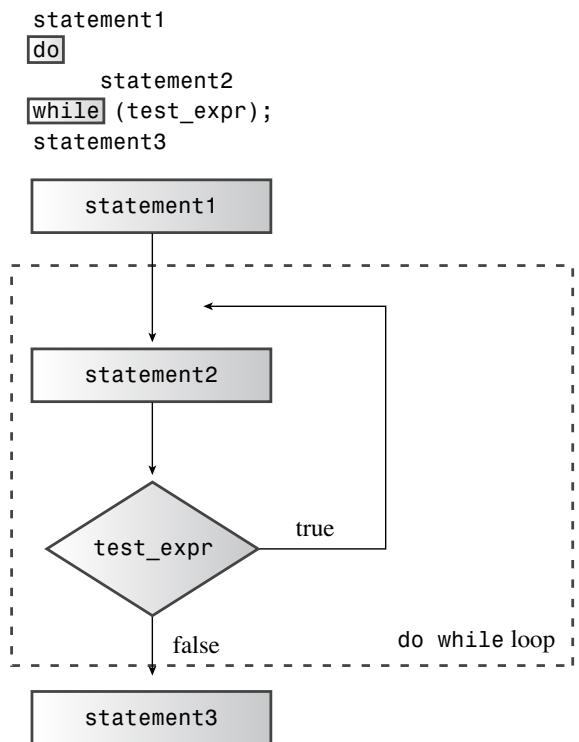 ▲ 图 5.4 do while 循环的结构
大多数时候入口条件循环更稳妥(清单 5.13 若改成 do while,会先把空字符也打印出来才发现到头了)。但”必须先拿到输入再检验”的场景天然适合它,程序清单 5.15 就是这样:
// dowhile.cpp -- 出口条件循环
#include <iostream>
int main()
{
    using namespace std;
    int n;

    cout << "Enter numbers in the range 1-10 to find ";
    cout << "my favorite number\n";
    do
    {
        cin >> n;          // 先执行循环体
    } while (n != 7);      // 再测试
    cout << "Yes, 7 is my favorite.\n";
    return 0;
}
Enter numbers in the range 1-10 to find my favorite number
9
4
7
Yes, 7 is my favorite.范围 for 循环(C++11)
专门为”对数组(或 vector、array 等容器)每个元素做点什么”而生:
double prices[5] = {4.99, 10.99, 6.87, 7.99, 8.49};
for (double x : prices)
    cout << x << endl;    // 逐个打印所有元素
x 依次代表数组每个元素。想修改元素要用引用写法 for (double &x : prices)(& 的含义第 8 章详谈),它允许后续代码改数组内容。还能直接遍历初始化列表:for (int x : {3, 5, 2, 8, 6})。
5.10 循环与文本输入
循环最常见也最重要的任务之一:逐字符读取文件或键盘输入。cin 支持三种单字符输入模式,各有不同的行为。
哨兵字符:cin >> ch
程序清单 5.16 选 # 作为停止符(哨兵字符),边读边回显边计数:
// textin1.cpp -- 用 while 循环读字符
#include <iostream>
int main()
{
    using namespace std;
    char ch;
    int count = 0;          // 基本输入
    cout << "Enter characters; enter # to quit:\n";
    cin >> ch;              // 读一个字符
    while (ch != '#')       // 测试该字符
    {
        cout << ch;         // 回显该字符
        ++count;            // 计数
        cin >> ch;          // 读下一个字符
    }
    cout << endl << count << " characters read\n";
    return 0;
}
Enter characters; enter # to quit:
see ken run#really fast
seekenrun
9 characters read两个发现:循环前的首次读取是必要的(第一个字符可能就是 #);循环体末尾的再读取推动程序前进,漏了它就死循环。但输出里空格全没了——cin >> 读 char 时会跳过空格、制表符和换行符。另外输入是缓冲的:按回车才整包发送,所以 # 之后还能打字,程序处理到 # 就收手。
cin.get(char):不放过任何字符
程序清单 5.17 把 cin >> ch 换成成员函数 cin.get(ch),空格、制表、换行一个不漏:
// textin2.cpp -- 使用 cin.get(char)
#include <iostream>
int main()
{
    using namespace std;
    char ch;
    int count = 0;

    cout << "Enter characters; enter # to quit:\n";
    cin.get(ch);    // 使用 cin.get(ch) 函数
    while (ch != '#')
    {
        cout << ch;
        ++count;
        cin.get(ch);    // 再用一次
    }
    cout << endl << count << " characters read\n";
    return 0;
}
Enter characters; enter # to quit:
Did you use a #2 pencil?
Did you use a
14 characters readC 程序员会嘀咕:传 ch 而不是 &ch 怎么能改变它的值?答案是 C++ 的引用机制(iostream 把参数声明为引用类型),第 8 章揭晓。同一个名字 get() 能以 cin.get(name, ArSize)、cin.get(ch)、cin.get() 三种参数形态出现,靠的是函数重载(同名不同参,第 8 章详谈)。
EOF:文件结束条件
用 # 停车不保险——# 可能是合法输入。更强大的办法是检测文件结束(EOF)。操作系统支持把文件重定向成输入(如 gofish <fishtale),也支持键盘模拟 EOF:Windows 命令行按 Ctrl+Z 回车,Unix/Linux 按行首 Ctrl+D。
cin 检测到 EOF 会设置 eofbit 和 failbit 两个标记;eof() 报告是否遇到 EOF,fail() 在 eofbit 或 failbit 任一被置位时返回 true。注意它们报告的是最近一次读取尝试的结果,所以测试要放在读取之后。程序清单 5.18:
// textin3.cpp -- 读取字符直到文件尾
#include <iostream>
int main()
{
    using namespace std;
    char ch;
    int count = 0;
    cin.get(ch);               // 尝试读一个字符
    while (cin.fail() == false) // 测试是否 EOF
    {
        cout << ch;            // 回显字符
        ++count;
        cin.get(ch);           // 再尝试读下一个
    }
    cout << endl << count << " characters read\n";
    return 0;
}
The green bird sings in the winter.<ENTER>
The green bird sings in the winter.
Yes, but the crow flies in the dawn.<ENTER>
Yes, but the crow flies in the dawn.
<CTRL>+<Z><ENTER>
73 characters readEOF 之后 cin 不再读入(要恢复可用 cin.clear() 清除标记)。这个”先读一次、测试、处理、再读一次”的设计可以层层化简:while (!cin.fail()) 用取反写法;又因 cin 对象在需要 bool 的场合会转换成”最近读取是否成功”,可写 while (cin);最终因为 cin.get(ch) 返回 cin 本身,整个循环可浓缩成:
while (cin.get(ch)) // 输入成功就继续
{
    ...             // 处理
}
读取、测试合二为一,三条军规全部压进一个条件里。
第三种:无参数的 cin.get()
无参数的 cin.get() 返回读到的字符(int 类型),模仿 C 的 getchar();EOF 时返回符号常量 EOF(定义在 iostream 中,通常是 -1,保证不同于任何合法字符)。程序清单 5.19:
// textin4.cpp -- 用 cin.get() 读字符
#include <iostream>
int main(void)
{
    using namespace std;
    int ch; // 必须是 int 而不是 char
    int count = 0;

    while ((ch = cin.get()) != EOF) // 测试文件尾
    {
        cout.put(char(ch));
        ++count;
    }
    cout << endl << count << " characters read\n";
    return 0;
}
The sullen mackerel sulks in the shadowy shallows.<ENTER>
The sullen mackerel sulks in the shadowy shallows.
Yes, but the blue bird of happiness harbors secrets.<ENTER>
Yes, but the blue bird of happiness harbors secrets.
<CTRL>+<Z><ENTER>
104 characters readwhile ((ch = cin.get()) != EOF) 的括号必须完整:先执行赋值(赋值表达式的值就是 ch),再与 EOF 比较。写成 while (ch = cin.get() != EOF) 的话,!= 优先级高于 =,ch 会被赋成比较结果 0 或 1。因为 EOF 可能超出 char 的表示范围(比如 char 无符号的系统),这里 ch 必须声明为 int。两种 get() 的对比:
| 属性 | cin.get(ch) | ch=cin.get() |
|---|---|---|
| 传递输入字符的方式 | 赋给参数 ch | 用函数返回值赋给 ch |
| 字符输入时的返回值 | istream 类对象(bool 转换后为 true) | 字符码,int 类型 |
| EOF 时的返回值 | istream 类对象(bool 转换后为 false) | EOF |
cin.get(ch) 与对象模型结合更紧密(返回 cin 可拼接调用);cin.get() 主要方便从 C 的 getchar()/putchar() 代码快速移植。
自测:为什么清单 5.19 里 ch 必须是 int?
因为无参数的 cin.get() 在 EOF 时返回 EOF(通常是 -1),这个值可能不在 char 的表示范围内(如无符号 char 永远装不下 -1),只有 int 能可靠容纳所有字符码和 EOF。
5.11 嵌套循环与二维数组
C++ 没有”二维数组”这种独立类型——所谓二维数组就是元素本身还是数组的数组。比如 4 个城市 5 年的最高气温:
int maxtemps[4][5]; // 4 个元素,每个是含 5 个 int 的数组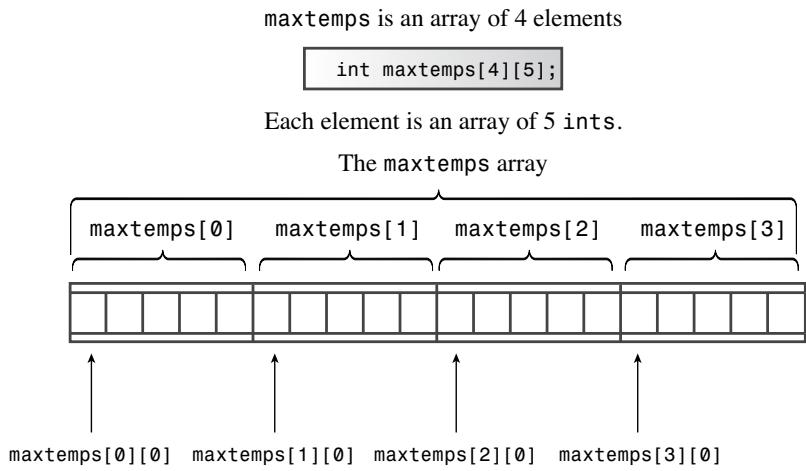 ▲ 图 5.5 数组的数组
可以把第一个下标当行、第二个下标当列:maxtemps[2][3] 是第 3 行第 4 列那个 int。
| 行下标 | 列下标 | 0 | 1 | 2 | 3 | 4 |
|---|---|---|---|---|---|---|
| maxtemps[0] | 0 | maxtemps[0][0] | maxtemps[0][1] | maxtemps[0][2] | maxtemps[0][3] | maxtemps[0][4] |
| maxtemps[1] | 1 | maxtemps[1][0] | maxtemps[1][1] | maxtemps[1][2] | maxtemps[1][3] | maxtemps[1][4] |
| maxtemps[2] | 2 | maxtemps[2][0] | maxtemps[2][1] | maxtemps[2][2] | maxtemps[2][3] | maxtemps[2][4] |
| maxtemps[3] | 3 | maxtemps[3][0] | maxtemps[3][1] | maxtemps[3][2] | maxtemps[3][3] | maxtemps[3][4] |
初始化由一维规则嵌套而来——逗号分隔的”每行初始化列表”,再套一层大括号:
int maxtemps[4][5] =    // 二维数组
{
    {96, 100, 87, 101, 105},    // maxtemps[0] 的值
    {96, 98, 91, 107, 104},     // maxtemps[1] 的值
    {97, 101, 93, 108, 107},    // maxtemps[2] 的值
    {98, 103, 95, 109, 108}     // maxtemps[3] 的值
};打印整个数组就是循环套循环:外层换行、内层换列:
for (int row = 0; row < 4; row++)
{
    for (int col = 0; col < 5; ++col)
        cout << maxtemps[row][col] << "\t";
    cout << endl;
}
程序清单 5.20 把列循环放外、行循环放内(按城市打印逐年数据),并用”char 指针数组”存一组字符串——每个元素存一个字符串常量的地址,效果如同字符串数组:
// nested.cpp -- 嵌套循环与二维数组
#include <iostream>
const int Cities = 5;
const int Years = 4;
int main()
{
    using namespace std;
    const char * cities[Cities] =    // 指针数组
    {
        "Gribble City",
        "Gribbletown",
        "New Gribble",
        "San Gribble",
        "Gribble Vista"
    };

    int maxtemps[Years][Cities] =    // 二维数组
    {
        {96, 100, 87, 101, 105},
        {96, 98, 91, 107, 104},
        {97, 101, 93, 108, 107},
        {98, 103, 95, 109, 108}
    };

    cout << "Maximum temperatures for 2008 - 2011\n\n";
    for (int city = 0; city < Cities; ++city)
    {
        cout << cities[city] << ":\t";
        for (int year = 0; year < Years; ++year)
            cout << maxtemps[year][city] << "\t";
        cout << endl;
    }
    return 0;
}
Maximum temperatures for 2008 - 2011
Gribble City: 96 96 97 98
Gribbletown: 100 98 101 103
New Gribble: 87 91 93 95
San Gribble: 101 107 108 109
Gribble Vista: 105 104 107 108字符串数据还有两种等价写法:char cities[Cities][25] 把每个字符串拷贝进定长数组(最多 24 字符,想改内容选它);const string cities[Cities] 用 string 对象数组(自动伸缩最省心)。三种写法用同一份初始化列表和同一段打印代码。
[5] 中,maxtemps[1] 是什么类型?
是”含 5 个 int 的数组”(也就是 maxtemps 的一个元素),不是一个 int。要拿到单个 int 还得再下一层下标,如 maxtemps[1][3]。
自测:
int x = 5; int y = x++ + ++x;这样写为什么不行?同一条语句里对 x 递增了两次,C++ 不定义这种行为,不同编译器可能给出不同结果。一条语句至多让一个变量自增一次。
自测:
while (name[i] != '\0');(注意末尾分号)会发生什么?分号让循环体成了空语句,循环条件又永远不变,程序就在这里无限空转;花括号里的真正循环体反而被排到了循环之后,永远不会执行。
自测:想倒序打印 string 对象 word 的每个字符,for 循环怎么写?
for (int i = word.size() - 1; i >= 0; i--) cout << word[i];——起始下标是长度减 1,测试用>=(不是>),更新用i--。