这一章在干嘛?
前三章我们只会用”一个变量存一个数”。但真实程序要处理一整年的销售记录、一个人的姓名、一名球员的多项数据。本章讲的就是 C++ 把基本类型”拼装”成更复杂数据的手段:数组(一排同类型格子)、字符串(字符数组 + string 类)、结构(不同类型打包)、共用体/枚举,以及最重要也最容易翻车的——指针与
new/delete动态内存管理。学完这章,你才算真正摸到了 C++ 的门把手。
4.10 类型组合与数组替代品 vector 和 array
4.1 数组初见
数组(array)是一种能存放多个同类型值的数据形式。声明数组要交代三件事:每个元素的类型、数组名、元素个数:
short months[12]; // 12 个 short,下标 0~11通用格式:typeName arrayName[arraySize];。注意 arraySize 必须是编译期就能确定的整数常量或常量表达式(如 8 * sizeof(int)),不能是运行时才确定的变量——这个限制后面会用 new 绕过去。
数组之所以叫”复合类型”,是因为它建立在别的类型之上:float loans[20]; 的类型不是”数组”,而是”float 数组”。没有万能的”数组”类型,只有具体的 int 数组、char 数组……
下标从 0 开始,没有商量余地。 12 个元素的下标是 0~11,最后一个元素的下标比数组长度小 1。访问元素用方括号加下标:months[0] 是第一个,months[11] 是最后一个。
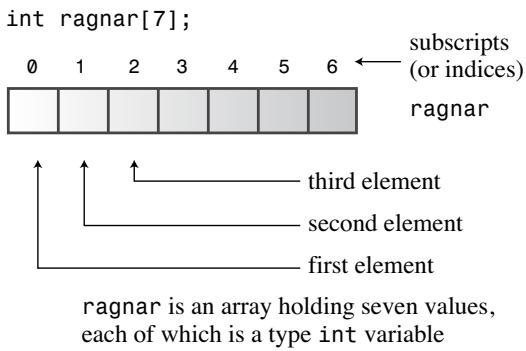 ▲ 图 4.1 创建一个数组
常见坑:编译器不检查下标越界
给不存在的
months[101]赋值,编译器一声不吭,但运行时可能破坏数据甚至让程序崩溃。C++ 把”用合法下标”的责任完全交给了程序员。
程序清单 4.1 演示了数组声明、逐个赋值和初始化列表:
// arrayone.cpp -- 小整型数组
#include <iostream>
int main()
{
    using namespace std;
    int yams[3];            // 三个元素的数组
    yams[0] = 7;            // 给第一个元素赋值
    yams[1] = 8;
    yams[2] = 6;

    int yamcosts[3] = {20, 30, 5}; // 声明的同时初始化

    cout << "Total yams = ";
    cout << yams[0] + yams[1] + yams[2] << endl;
    cout << "The package with " << yams[1] << " yams costs ";
    cout << yamcosts[1] << " cents per yam.\n";
    int total = yams[0] * yamcosts[0] + yams[1] * yamcosts[1];
    total = total + yams[2] * yamcosts[2];
    cout << "The total yam expense is " << total << " cents.\n";

    cout << "\nSize of yams array = " << sizeof yams;
    cout << " bytes.\n";
    cout << "Size of one element = " << sizeof yams[0];
    cout << " bytes.\n";
    return 0;
}
输出:
Total yams = 21
The package with 8 yams costs 30 cents per yam.
The total yam expense is 410 cents.
Size of yams array = 12 bytes.
Size of one element = 4 bytes.
注意 sizeof 用于数组名得到整个数组的字节数(3×4=12),用于单个元素则得到该元素的大小(4 字节)——yams 是数组,yams[1] 只是个 int。
初始化规则
- 初始化列表
{...}只能在定义时用,之后不能再用,也不能把一个数组整体赋给另一个:
int cards[4] = {3, 6, 8, 10}; // 可以
int hand[4];
hand[4] = {5, 6, 7, 9};       // 不行!
hand = cards; // 不行!- 初始值可以比元素少,剩下的一律补 0。所以把数组全部清零只需
long totals[500] = {0};(注意{1}只会把第一个元素设为 1,其余仍是 0)。 - 方括号留空让编译器数:
short things[] = {1, 5, 3, 8};得到 4 元素数组。想知道元素个数可以写int num_elements = sizeof things / sizeof (short); - 函数内定义且未初始化的数组,元素的值是未定义的(内存里原来是什么就是什么)。
C++11 又放宽了几条:可以省略 =(double earnings[4] {1.2e4, 1.6e4, 1.1e4, 1.7e4};);空大括号全部清零(unsigned int counts[10] = {};);列表初始化禁止收窄转换——long plifs[] = {25, 92, 3.0}; 非法(浮点转整型算收窄),char slifs[4] {'h', 'i', 1122011, '\0'}; 非法(超出 char 范围),char tlifs[4] {'h', 'i', 112, '\0'}; 合法。
通关标准:
能不看书写出”声明 12 个 short 的数组""部分初始化其余补零""让编译器数元素个数”三种写法;能解释为什么
sizeof 数组名和sizeof 数组元素结果不同;能说出下标越界的后果。
自测:
int hotelTips[5] = {5.0, 2.5};之后 hotelTips[3] 是多少?是 0。部分初始化时,编译器把其余元素全部置 0(注意 5.0 还会被收窄规则盯上,C++11 下这句其实是非法的,应写 5.0f 或改成 double 数组)。
4.2 字符串:C 风格与输入的坑
字符串是内存中连续字节存放的一串字符。C 风格字符串有个特殊约定:最后一个字符是空字符 \0(ASCII 码 0),用来标记字符串结束。所有处理字符串的函数(包括 cout)都是逐字符处理直到遇到 \0 才停。
char dog[8] = {'b', 'e', 'a', 'u', 'x', ' ', 'I', 'I'}; // 不是字符串!没有 \0
char cat[8] = {'f', 'a', 't', 'e', 's', 's', 'a', '\0'}; // 是字符串!
如果让 cout 显示 dog,它打印完 8 个字符后还会继续往后把内存当字符打印,直到碰巧遇到某个 0 字节为止。
更省事的写法是用带双引号的字符串常量,编译器会自动补上 \0:
char bird[11] = "Mr. Cheeps"; // \0 是隐含的
char fish[] = "Bubbles";      // 让编译器数,7 个字节
计算数组大小时别忘了 \0 也占一格。字符串常量与字符常量不可混用:'S' 就是 83(ASCII 码),而 "S" 是”字符 S + \0”组成的字符串,代表的是它的内存地址,char shirt_size = "S"; 是类型不匹配的非法语句。
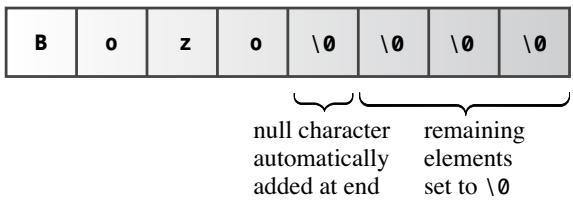 ▲ 图 4.2 用字符串初始化数组
拼接字符串常量
两个只隔空白符(空格/制表/换行)的字符串常量会自动拼接成一体,换行写长字符串时很好用:
cout << "I'd give my right arm to be" " a great violinist.\n";程序清单 4.2 同时演示了用 cin 读入、用 strlen() 量长度、用下标截断字符串:
// strings.cpp -- 把字符串存进数组
#include <iostream>
#include <cstring> // 为了使用 strlen() 函数
int main()
{
    using namespace std;
    const int Size = 15;
    char name1[Size];           // 空数组
    char name2[Size] = "C++owboy"; // 已初始化的数组

    cout << "Howdy! I'm " << name2;
    cout << " ! What's your name?\n";
    cin >> name1;
    cout << "Well, " << name1 << ", your name has ";
    cout << strlen(name1) << " letters and is stored\n";
    cout << "in an array of " << sizeof(name1) << " bytes.\n";
    cout << "Your initial is " << name1[0] << ".\n";
    name2[3] = '\0';    // 设为空字符
    cout << "Here are the first 3 characters of my name: ";
    cout << name2 << endl;
    return 0;
}
Howdy! I'm C++owboy! What's your name?
Basicman
Well, Basicman, your name has 8 letters and is stored in an array of 15 bytes.
Your initial is B.
Here are the first 3 characters of my name: C++要点:sizeof(name1) 给出整个数组的 15 字节,strlen(name1) 只统计到 \0 为止的可见字符(Basicman 是 8 不是 9);name2[3] = '\0'; 把第 4 个字符换成空字符,字符串就在 3 个字符处”提前结束”,尽管数组后面还存着其余字符——存放字符串的函数只认 \0 不认数组长度。
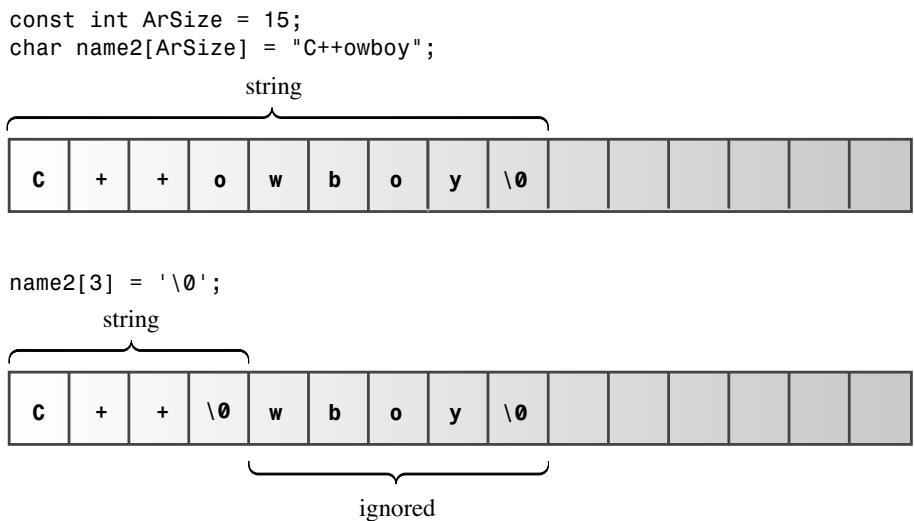 ▲ 图 4.3 用 \0 缩短字符串
cin 读字符串的问题
cin >> 数组名 以空白符(空格、制表、换行)为界,一次只读一个单词。程序清单 4.3 暴露了这个坑:
// instr1.cpp -- 读取多个字符串
#include <iostream>
int main()
{
    using namespace std;
    const int ArSize = 20;
    char name[ArSize];
    char dessert[ArSize];

    cout << "Enter your name:\n";
    cin >> name;
    cout << "Enter your favorite dessert:\n";
    cin >> dessert;
    cout << "I have some delicious " << dessert;
    cout << " for you, " << name << ".\n";
    return 0;
}
运行结果(根本没机会输入甜点!):
Enter your name:
Alistair Dreeb
Enter your favorite dessert:
I have some delicious Dreeb for you, Alistair.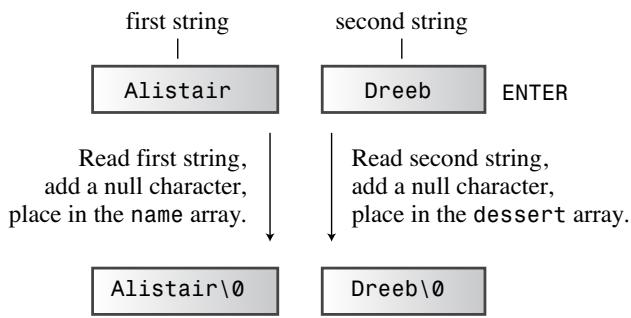 ▲ 图 4.4 cin 眼中的字符串输入
cin 把 Alistair 存进 name 后,Dreeb 还赖在输入队列里,第二次读取直接把 Dreeb 当成了甜点。此外 cin >> 对”输入比数组还长”也毫无防护。
getline() 与 get():按行读取
面向行的读取有两个选择:
cin.getline(name, ArSize):读整行直到换行符,最多读 ArSize-1 个字符(留一个位置给\0),读完后丢弃换行符。cin.get(name, ArSize):参数和读取行为相同,但把换行符留在输入队列里。
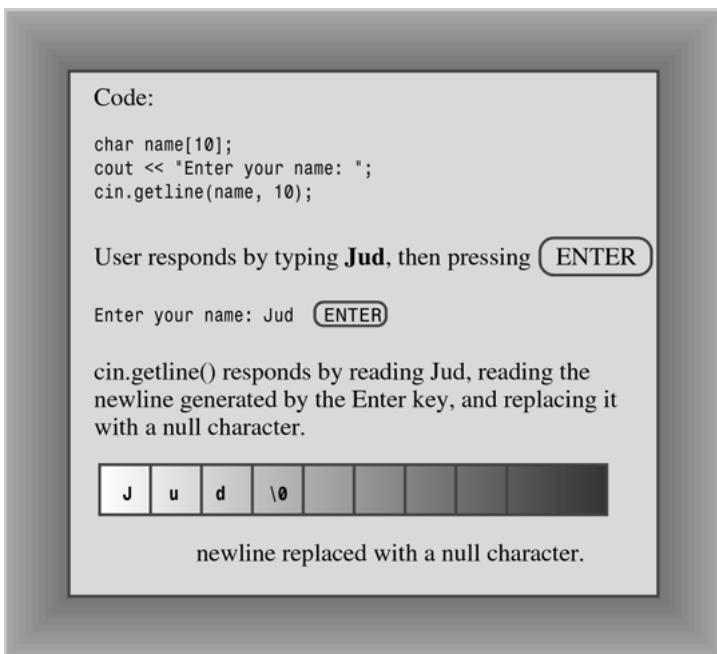 ▲ 图 4.5 getline() 读取并替换换行符
程序清单 4.4 用 getline() 就能正确处理带空格的名字:
// instr2.cpp -- 用 getline 读取多单词输入
#include <iostream>
int main()
{
    using namespace std;
    const int ArSize = 20;
    char name[ArSize];
    char dessert[ArSize];

    cout << "Enter your name:\n";
    cin.getline(name, ArSize); // 读到换行为止
    cout << "Enter your favorite dessert:\n";
    cin.getline(dessert, ArSize);
    cout << "I have some delicious " << dessert;
    cout << " for you, " << name << ".\n";
    return 0;
}
Enter your name:
Dirk Hammernose
Enter your favorite dessert:
Radish Torte
I have some delicious Radish Torte for you, Dirk Hammernose.get() 因为留下换行符,连续两次 cin.get(name, ArSize); cin.get(dessert, ArSize); 会让第二次调用一头撞上残留的换行符、读个空。解决办法是中间插一句不带参数的 cin.get(); 把换行符吃掉,或者用拼接调用:
cin.get(name, ArSize).get(); // 读字符串,再吃掉换行符之所以能拼,是因为 cin.get(name, ArSize) 返回 cin 对象本身,可以继续调它的方法。程序清单 4.5 用的就是这种写法:
// instr3.cpp -- 用 get() 读取多单词输入
#include <iostream>
int main()
{
    using namespace std;
    const int ArSize = 20;
    char name[ArSize];
    char dessert[ArSize];

    cout << "Enter your name:\n";
    cin.get(name, ArSize).get(); // 读字符串、换行符
    cout << "Enter your favorite dessert:\n";
    cin.get(dessert, ArSize).get();
    cout << "I have some delicious " << dessert;
    cout << " for you, " << name << ".\n";
    return 0;
}
两个补充:get() 读到空行会设置 failbit 导致后续输入被阻塞,可用 cin.clear(); 恢复;输入超过限定长度时,两者都把多余字符留在队列,但 getline() 还会额外设置 failbit 关闭后续输入。
数字输入与行输入混用的坑
程序清单 4.6 是初学者必踩的经典坑:
// numstr.cpp -- 数字输入后紧跟行输入
#include <iostream>
int main()
{
    using namespace std;
    cout << "What year was your house built?\n";
    int year;
    cin >> year;
    cout << "What is its street address?\n";
    char address[80];
    cin.getline(address, 80);
    cout << "Year built: " << year << endl;
    cout << "Address: " << address << endl;
    cout << "Done!\n";
    return 0;
}
What year was your house built?
1966
What is its street address?
Year built: 1966
Address:
Done!cin >> year 读走 1966 后,把回车产生的换行符留在了队列;紧接着的 getline() 一看:换行符?空行!直接存了个空字符串。修复方法:读地址前先把换行符吃掉——(cin >> year).get(); 或分开写 cin >> year; cin.get();。
常见坑:数字输入后紧跟 getline()/get() 会读到空行
记住口诀:”>> 不吃回车,getline 只吃回车”。凡是
cin >>之后要按行读字符串,中间必须用cin.get()清掉残留的换行符。
自测:
cin.get(name, ArSize); cin.get(dessert, ArSize);连写为什么第二次读不到东西?因为第一个 get() 把行尾换行符留在队列里,第二个 get() 一开始就遇到换行符,判定为空行直接返回。
4.3 string 类入门
C++98 标准引入了 string 类(头文件 <string>,位于 std 命名空间),让你像用普通变量一样用字符串:
string str1;              // 空的 string 对象
string str2 = "panther";  // 初始化的 string 对象
程序清单 4.7 对比了 char 数组和 string 对象:
// strtype1.cpp -- 使用 C++ string 类
#include <iostream>
#include <string>    // 让 string 类可用
int main()
{
    using namespace std;
    char charr1[20];
    char charr2[20] = "jaguar";
    string str1;
    string str2 = "panther";

    cout << "Enter a kind of feline: ";
    cin >> charr1;
    cout << "Enter another kind of feline: ";
    cin >> str1;
    cout << "Here are some felines:\n";
    cout << charr1 << " " << charr2 << " "
         << str1 << " " << str2 << endl;
    cout << "The third letter in " << charr2 << " is "
         << charr2[2] << endl;
    cout << "The third letter in " << str2 << " is "
         << str2[2] << endl;    // string 也能用数组记法

    return 0;
}